Chris Shinnimin
Final Fantasy Bot Project Journal
A fun personal project to learn LLMs and React, and rekindle my love of a favourite childhood game.
September 10, 2025
Prev | Project Journal Entries | Github | Next
Time to Learn React: Bot App High Level Architecture
Key learnings today:
- The falcon3 3b model might be better for this task than llama 3.2.
- The falcon3 model seems better at distingishing between my concepts of RAM Read Requests and Ram Write Requests.
- React components can be class components or function components, and function components are preferred.
- At end of day today my solution contains entirely class components, but I am now learning that function components and hooks are best practice. Some refactoriing coming soon.
- I've never considered myself good at UI/UX, but with AI on my side that may change.
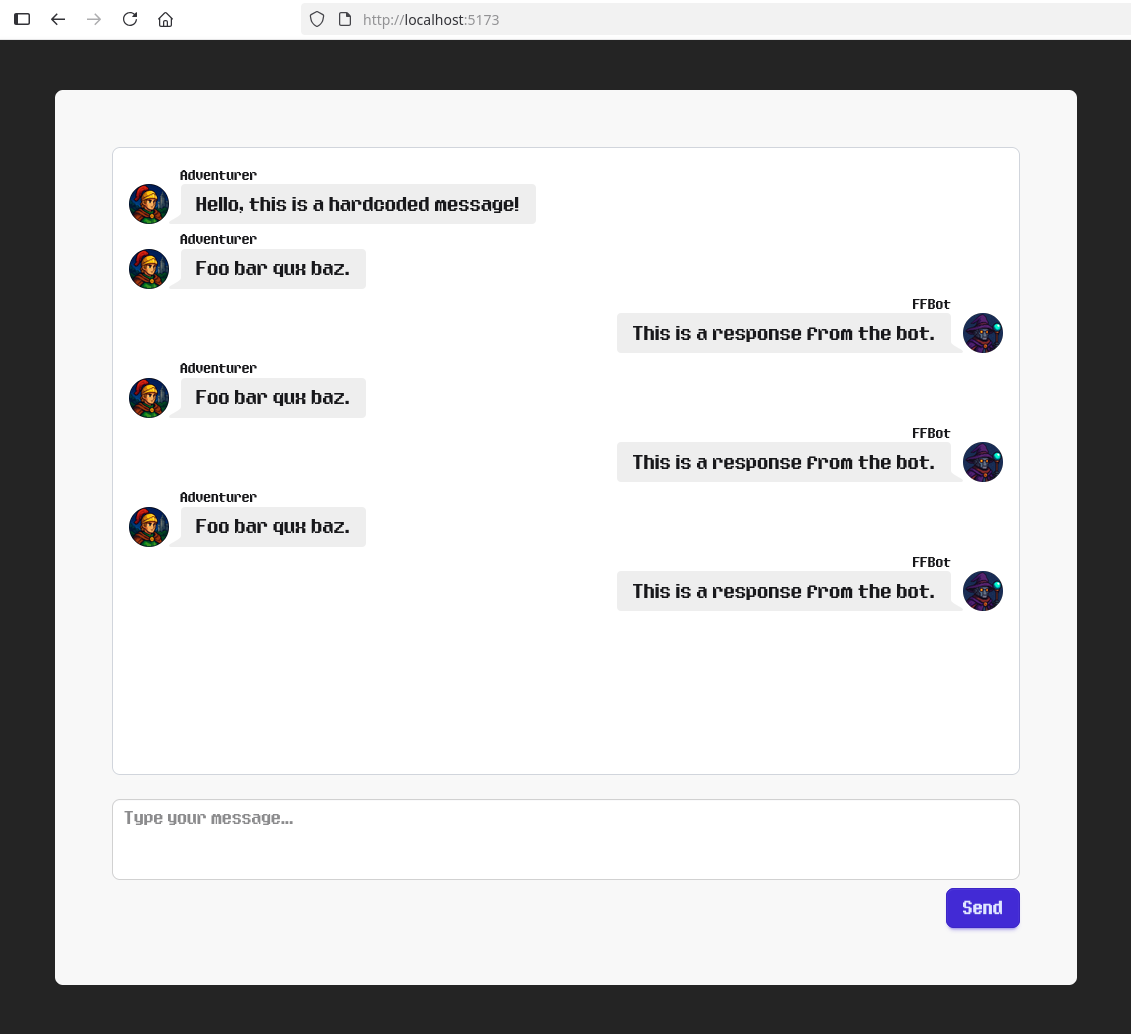
- I actually surprised myself with how good the UI of my app looks.
Exploring New Models: gemma3, exaone-deep and falcon3
After spending the morning adjusting my training information for Llama 3.2 to try to get it to understand the difference between when it needs to simply answer a question (RRR) and when it needs to update game state (RWR) Llama 3.2 was having increasing difficulty. I decided to try a few alternatiove models. Here were the results:
- The gemma3 model, despite being a similar size to the others, would not even run on my machine.
- The exaone-deep model ran on my machine and after feeding it my instructions, initially seemed to be generating a response that seemed like it really understood a lot better than Llama... until it became apparent that it was going to ramble on forever. It had proposed about 30 alternative possibilities for what my original instructions might mean, over the course of 15 minutes or so, before I gave up.
- The falcon3 model turned out to be the porridge that was just right. It ingested my instructions fairly quickly and was performing better than Llama 3.2 for the task. I should note that there are still a LOT of limitations with my current training set and I will have to learn a lot more about how to train LLM models as this project goes on.
Choosing a UI Component Library for the Bot App
I did some research and found 3 choices that seemed to come highly recommended: Radix UI, Daisy UI / Tailwind, and a lighter option: Shadcn.
- Despite the popularity of Radix, after browsing the docs and looking at the component library, it didn't really seem to have what I was visually looking for for my chat app, so I moved on.
- I looked at a lightweight option in Shadcn, but it seemed overly complicated to install and configure compared to the next option I found.
- After looking at the DaisyUI component catalog I could see good potential. It had the components I needed, and was exteremely easy to set up and use, so I went with it. It did involve converting my React project into a Tailwind React project. Going forward, I'll need to learn a bit more about Tailwind as well.
Githib Copilot and I Team Up on High Level Architecture
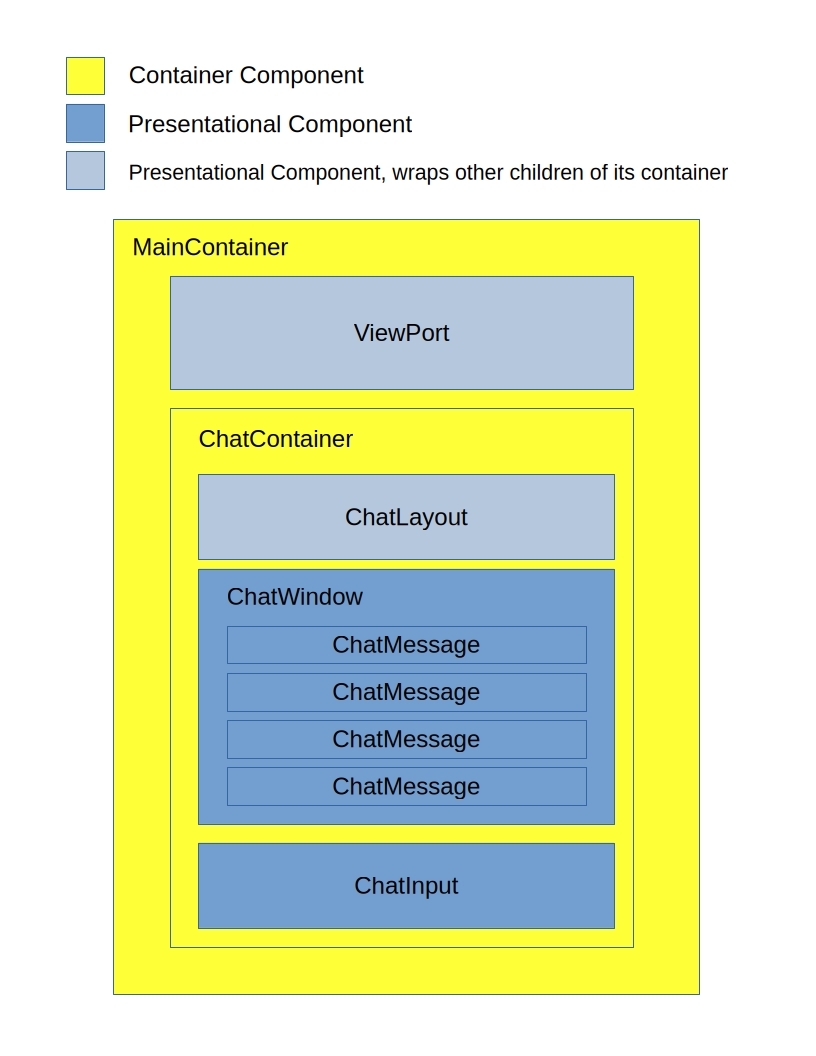
My final achievement of the day was to get the high level architecture of the Bot App drawn up. I am a strong proponent of the Container/Presentational pattern for front end components. In my experience its main strengths are:
- A good separation of concerns
- Lends itself well to reusability (presentational component reuse)
I created two containers that will hold state and drive the "business logic", and five stateless presentational components that will render the UI. As a naming custom, I always name containers with the suffix 'Container' so they can be easily identified.
- MainContainer
- Houses the ViewPort and the ChatContainer.
- Will be responsible for any initial setup actions that need to take place.
- ChatContainer
- Houses the ChatLayout, ChatWindow and ChatInput.
- Will be responsible for the actions that relay messages back and forth from the user to the LLM.
- ViewPort
- Provides the UI logic for the MainContainer.
- ChatLayout
- Provides the UI logic for the ChatContainer.
- ChatWindow
- Contains ChatMessage components.
- Is the scrolling chat window that will display the ongoing conversation.
- ChatMessage
- An individual message within the ChatWindow.
- Houses the Daisy UI Chat Bubble components.
- ChatInput
- Houses the Daisy UI components needed for the user to send messages.
I even found a cool 8-bit font that makes it look a bit more "Final Fantasy". There's still a lot of to-do's, like building the interface to the LLM and converting the components to function components to align with best practices, but I was pretty happy with how I had it looking by EOD: